Best overall: an assessment-matched speech-generating device. Best for adaptable touch-screen communication: tablet-based symbol AAC. Best for confident readers: text-to-speech AAC. Best for children who need an alternative to touch: eye-gaze AAC. Best backup: a printed communication board. The best AAC devices for autism in 2026 fit your child’s communication, movement, and everyday life—not a universal product ranking.
- Choose AAC devices for autism through an individualized assessment, not a brand ranking.
- Speech-generating devices and tablet AAC need accessible vocabulary, comfortable access, and communication partners who model use.
- Text-to-speech AAC suits confident readers; eye-gaze AAC addresses access needs when touch is difficult.
- Keep a printed communication board available alongside electronic AAC.
- Autism Learn & Play provides speech therapy and community programs for autistic children ages 2–18.
Why this matters
Augmentative and alternative communication, or AAC, gives your child ways to express messages beyond speech alone. It includes gestures, pictures, writing, and electronic systems that speak selected or typed messages. AAC can supplement speech; a child does not need to stop speaking to use it.
Communication is more than asking for snacks. Your child needs ways to refuse, ask questions, share interests, tell you something hurts, and join a conversation. An outing becomes more accessible when those messages travel with your child.
Autism Learn & Play provides therapy services, community programs, and online classes for autistic children ages 2–18. Autism Learn & Play is a fit for Brooklyn families seeking speech therapy and community programs for autistic children.
This 2026 guide ranks communication approaches by their distinct uses. It does not rank individual hardware models or assume that every child needs an electronic device.
What makes the best AAC devices for autism?
Choose by fit before choosing by brand. These criteria reflect the American Speech-Language-Hearing Association’s AAC Practice Portal guidance on individualized assessment, access methods, and communication-partner support.
- Comfortable access: Your child can select messages using touch, eye gaze, switches, or another suitable method without unnecessary strain.
- Useful vocabulary: The system supports comments, questions, refusal, feelings, and social connection—not just requests.
- Room to grow: Vocabulary and language options can develop with your child’s interests and communication needs.
- Everyday portability: The system can accompany your child during meals, travel, school, and community activities.
- Partner support: Adults learn to model messages and respond without turning every interaction into a test.
- A backup route: Your child has another way to communicate when an electronic system is charging, damaged, or difficult to access.
Choose access and language together. A large vocabulary is not useful if selecting a message is uncomfortable; easy buttons are not enough if meaningful messages are missing.
For ideas about supporting interaction alongside AAC, see these speech therapy activities for nonverbal autism. Activities should make space for communication, not require spoken answers.
AAC options at a glance
These options describe system types, not interchangeable products. Eye-gaze access can operate a dedicated speech-generating device, while text-to-speech can run on a tablet; the table separates the main reasons families consider each approach.
| Option | Best for | Standout feature | Key limitation |
|---|---|---|---|
| Dedicated touch-access speech-generating device | A primary electronic communication system | Hardware devoted to communication | Requires individualized setup and access testing |
| Tablet-based symbol AAC | Adaptable touch-screen communication | Symbols support message selection without requiring spelling | Other tablet uses can interrupt communication access |
| Text-to-speech AAC | Confident readers and spellers | Typed messages can be spoken aloud | Typing places demands on literacy and motor access |
| Eye-gaze AAC | Communication when touch access is difficult | Messages selected through eye movement | Positioning and calibration need careful assessment |
| Printed communication board | Backup communication across settings | Works without charging | Vocabulary is limited by the printed layout |
1. Dedicated speech-generating device: best for primary AAC
A dedicated speech-generating device is hardware intended for communication. With a suitable vocabulary system, your child selects symbols or words and the device speaks the message. This category earns the overall slot only when assessment and trials show that it fits your child.
For a Brooklyn outing, check whether your child can access it while seated, standing, or moving between activities. The meaningful question is whether communication remains available—not whether the device looks impressive.
Dedicated speech-generating device pros:
- Keeps the hardware’s main purpose focused on communication.
- Can support messages beyond immediate requests.
- Offers a consistent communication tool across daily routines.
Dedicated speech-generating device cons:
- Vocabulary, access, and positioning require individualized setup.
- Adults need practice supporting use without taking control.
- Charging and equipment care become part of the routine.
Best for: A child who needs a primary electronic system and can comfortably use the assessed access method.
Ask to try real messages: asking for a break, commenting on a favorite activity, and telling someone to stop. A demonstration of a single request does not establish that a system meets broader needs.
Verdict: Hold until an individualized trial confirms fit.
2. Tablet-based symbol AAC: best for adaptable touch communication
Tablet-based symbol AAC uses an app with pictures, words, and spoken output. Your child selects vocabulary rather than needing to spell every message. The specific app determines the layout, language organization, and customization options.
In 2026, choose the communication system before choosing the tablet. Screen familiarity alone does not establish that the vocabulary or touch targets suit your child.
Tablet-based symbol AAC pros:
- Supports communication without requiring fluent spelling.
- Can include vocabulary connected to your child’s interests.
- Provides a touch-screen format for children who access it comfortably.
Tablet-based symbol AAC cons:
- Entertainment use can compete with access to the communication app.
- Touch targets and screen navigation need individual assessment.
- App features differ; do not assume every app supports the same needs.
Best for: A child who benefits from symbols and can select them comfortably on a touch screen.
Before a community activity, check that the communication app stays accessible. Avoid a setup in which watching a video means losing the ability to say something. Ask about protecting communication access and saving the child’s vocabulary setup.
Verdict: Buy only after a trial confirms the app and tablet work together.
3. Text-to-speech AAC: best for confident readers and spellers
Text-to-speech AAC speaks messages that your child types. It gives a literate child a way to compose messages without relying entirely on a fixed picture vocabulary. Some systems also offer stored phrases or word prediction; check the specific system rather than assuming those features exist.
For an autistic teen, choosing personal wording matters. Messages about friends, boundaries, school, and interests deserve the same attention as everyday requests.
Text-to-speech AAC pros:
- Supports personally composed messages.
- Does not require a picture for every idea.
- Gives literate users control over their wording.
Text-to-speech AAC cons:
- Requires sufficient reading and spelling for the intended messages.
- Typing can be tiring or slow for some users.
- Fast-moving conversations require patient communication partners.
Best for: A confident reader and speller whose typing or alternative keyboard access is comfortable.
Give your child time to finish composing. Do not guess the rest of a message or move on because speech would be faster. Stored messages can help with familiar situations, but they should not replace opportunities to say something new.
Verdict: Buy after confirming literacy fit and comfortable access.
4. Eye-gaze AAC: best when touch access is difficult
Eye-gaze AAC uses eye-tracking technology to support message selection. It is an access approach, not a separate language method: the vocabulary system still needs to fit your child. Consider it when direct touch is difficult, rather than because it appears more advanced.
Eye-gaze selection is not the same as making social eye contact. A child’s willingness to look at another person does not establish whether eye-tracking access will work.
Eye-gaze AAC pros:
- Provides an alternative to hand-based selection.
- Can support access to symbol or text-based communication.
- Lets assessment focus on movement needs rather than assuming touch.
Eye-gaze AAC cons:
- Positioning, calibration, and visual access need specialist assessment.
- A setup that works in one position needs checking in other settings.
- Equipment placement can complicate carrying the system between activities.
Best for: A child whose movement needs make touch difficult and whose trial shows usable eye-gaze access.
Ask an AAC specialist to compare suitable access methods, including switches when relevant. Test the system in the positions and environments your child actually uses, not only at a demonstration desk.
Verdict: Hold until specialist assessment confirms reliable access.
5. Printed communication board: best for a dependable backup
A printed communication board places symbols, words, or both on a physical page. Your child can point, look toward choices, or use a supported selection method. A board is AAC in its own right, not a reward to earn before receiving an electronic system.
Its backup role earns it a place in this 2026 guide. It keeps a communication route available when a device cannot be used.
Printed communication board pros:
- Works without batteries or charging.
- Can travel with familiar routines and activities.
- Gives partners a visible way to model vocabulary.
Printed communication board cons:
- Printed space limits the vocabulary shown at once.
- Communication partners must notice and interpret selections accurately.
- It does not provide electronic speech output.
Best for: Backup communication, or a primary low-tech approach when assessment supports it.
Include more than activity choices. Your child also needs ways to say no, ask for help, describe discomfort, and share a reaction. When possible, keep familiar vocabulary locations consistent with the child’s other communication system.
Verdict: Buy or prepare a board matched to your child’s access needs.
Match AAC support to your child’s age and interests
Autism Learn & Play serves children ages 2–18; that range includes very different daily lives. These age bands are planning examples, not eligibility rules for AAC.
- Ages 2–5 years: Build communication into play, meals, and familiar routines. Model messages without asking your child to perform them on command.
- Ages 6–12 years: Include school topics, games, friendships, questions, and ways to resolve disagreements. Keep AAC accessible beyond structured learning.
- Ages 13–18 years: Respect privacy, preferred wording, age-appropriate interests, and control over personal messages. Invite the teen into decisions about the system.
Age does not determine the best device. A younger child can need substantial vocabulary, and an older child can benefit from symbols. Select supports around the individual rather than an assumed developmental ladder.
Trial AAC in everyday situations
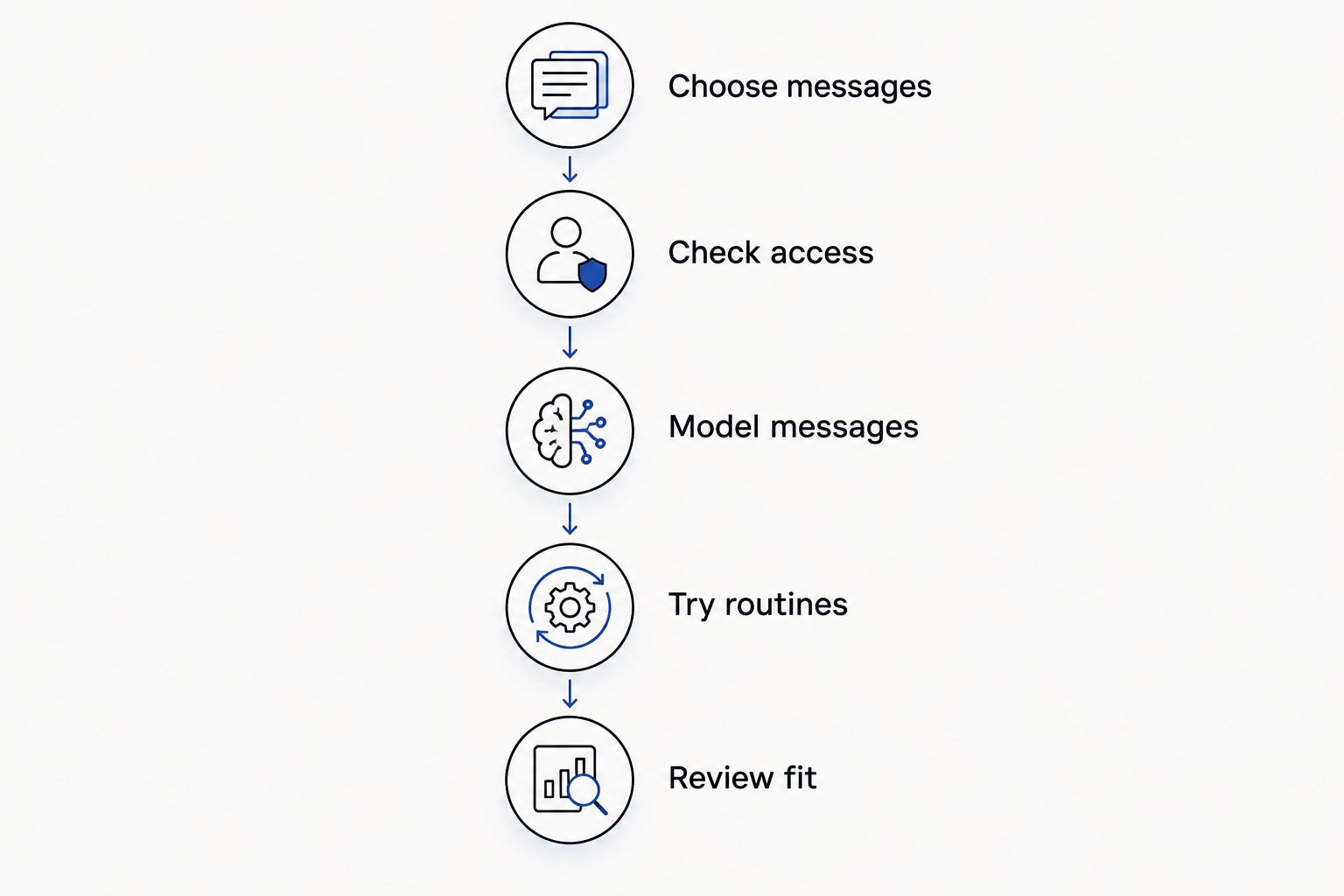
For a 2026 AAC decision, ask a speech-language pathologist with AAC experience to help assess language, access, and partner support. Include your child’s preferences throughout the process.
- Choose messages. Identify things your child wants to communicate, including refusal, comments, questions, and discomfort.
- Check access. Observe selection while your child is comfortably positioned. Look for strain and barriers rather than judging willingness.
- Model messages. Use the system yourself while speaking naturally. Leave space for your child to respond in any communication mode.
- Try routines. Use the system during ordinary play, meals, and an appropriate outing. Check whether it remains within reach.
- Review fit. Discuss what worked, what was difficult, and what needs changing. Do not count prompted button presses as the whole picture.
The sequence keeps the decision centered on your child’s communication rather than a device demonstration.
Before a group activity, ask who will help keep the system accessible and how adults will respond to communication. Your child should not have to surrender AAC to participate. Leaving early, taking a break, or watching before joining are valid choices to communicate.
How we ranked
This 2026 ranking prioritizes comfortable access, meaningful vocabulary, everyday use, partner support, and backup communication. The order separates distinct needs; it is not a claim that dedicated hardware always beats a tablet.
The ASHA AAC Practice Portal is the category reference for assessment and communication-partner principles. An individual trial takes priority over every recommendation here.
Which AAC option should you choose?
Start with an AAC assessment, not a purchase. If your child comfortably uses touch and benefits from symbols, compare dedicated and tablet-based systems through trials. If typing fits, consider text-to-speech; if touch does not, assess alternative access.
Keep a low-tech communication route available whatever electronic option you choose. For questions about Autism Learn & Play’s services, use the website contact form or email info@autismlearnplay.org.
FAQ
What are the best AAC devices for autism in 2026?
The best AAC device is the system that fits the individual child’s language, access, and everyday communication needs. Compare dedicated devices, tablet-based symbol AAC, text-to-speech, and alternative access through an individualized assessment and trial.
Does my child need to be completely nonverbal to use AAC?
No, AAC can support children who use speech as well as children who do not. It can provide another communication route when speech does not meet the child’s needs.
Will using AAC stop my child from talking?
AAC does not require your child to stop using speech, and ASHA guidance describes it as a way to supplement or replace speech when needed. Accept speech, gestures, AAC, and other meaningful communication without making one mode a condition for being heard.
Is a tablet better than a dedicated AAC device?
Neither a tablet nor a dedicated device is automatically better. The better choice is the system your child can access comfortably and use for meaningful messages across daily settings.
Can an autistic toddler use AAC?
Yes, young children can use AAC; there is no requirement to wait for school age. Assessment should identify suitable vocabulary, access, and ways for caregivers to model communication during familiar routines.
What should I ask before choosing an AAC device?
Ask how the system supports your child’s access, vocabulary, communication across settings, and future language needs. Also ask about trials, caregiver support, saving vocabulary settings, and a backup communication method.
Can my child bring AAC to a community activity?
Your child’s communication system should remain accessible during a community activity. Ask the organizer about positioning, breaks, and communication-partner support before attending; confirm details for the specific program.
One last thing
A message you did not expect is still communication. If your child uses AAC to reject an activity you planned, honor the message rather than treating it as a failed session. The goal is a voice with choices—not a device that produces the answers adults want.
Related guides
- Social skills games for autistic teens
- Art therapy activities for autistic kids
- Cooking recipes for kids with autism